Controls
The game uses the original PS2 layout. Everything can be remapped in the launcher's Controls tab, which names each button the PlayStation way.
| PS2 button | Controller | Keyboard |
|---|---|---|
| Cross / Circle / Square / Triangle | A / B / X / Y | Space / Esc / C / V |
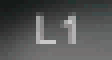
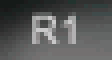
| L1 / R1 | LB / RB | F / R |
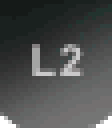
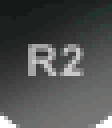
| L2 / R2 | LT / RT | Q / E |
| Start / Select | Start / Back | Enter / Tab |
| L3 (press the left stick) | Left stick press | X |
| Left stick and D-pad | Left stick and D-pad | Arrow keys |
As in the PS2 game: all 15 grabs are on L1, R1, L2, R2 and their combinations; Square is Boost, and Tweak during a grab; in the Default preset, spins and flips are on the D-pad (in the air, the left stick leans the rider); L3 cancels a jump; in the Pro preset, Triangle is the reverse camera. Options → Configure Controller in the game shows each preset.
In the game window
| Alt+Enter or F11 | Window / fullscreen |
| F12 | Screenshot |
| Alt+F4 | Quit |
Button styles
Button style (Controls tab) chooses the buttons the game shows: Auto, Xbox modern, PlayStation modern or PS2 original, the PS2 look: pixel buttons at their original size. The trick tutorial and Configure Controller show a matching controller.
Only Xbox-style (XInput) controllers are supported natively for now. PlayStation controllers work through Steam Input or DS4Windows: pick PlayStation modern or PS2 original to see their buttons.