Controls
The game uses the original PS2 layout. Everything can be remapped in the launcher's Controls tab, which names each button the PlayStation way.
| PS2 button | Controller | Keyboard |
|---|---|---|
| Cross / Circle / Square / Triangle | A / B / X / Y | Space / Esc / C / V |
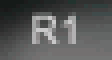
| L1 / R1 | LB / RB | F / R |
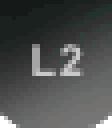
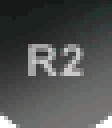
| L2 / R2 | LT / RT | Q / E |
| Start / Select | Start / Back | Enter / Tab |
| L3 (press the left stick) | Left stick press | X |
| Left stick and D-pad | Left stick and D-pad | Arrow keys |
As in the PS2 game: all 15 grabs are on L1, R1, L2, R2 and their combinations; Square is Boost, and Tweak during a grab; in the Default preset, spins and flips are on the D-pad (in the air, the left stick leans the rider); L3 cancels a jump; in the Pro preset, Triangle is the reverse camera. Options → Configure Controller in the game shows each preset.
In the game window
| Alt+Enter or F11 | Window / fullscreen |
| F12 | Screenshot |
| Shift+F12 | A burst of screenshots, in a folder of their own |
| Alt+F4 | Quit |
Button styles
Button style (Controls tab) chooses the buttons the game shows: Auto, Xbox modern, PlayStation modern or PS2 original, the PS2 look: pixel buttons at their original size. The trick tutorial and Configure Controller show a matching controller.
Controllers
Xbox-style (XInput) controllers work natively. With PlayStation controllers (experimental) on (Controls tab, Off by default), so do the DualShock 4 and the DualSense: with Button style at Auto, the game then shows PlayStation buttons, and a controller stays the same player until you unplug it. Leave the option off when another tool (Steam Input, DS4Windows, Steam with its PlayStation support) runs your controller, or the game would read it twice.
Other controllers work through Steam Input or DS4Windows. A DualShock 4 or DualSense run by one of these tools, with the option off, shows Xbox buttons with Button style at Auto: pick PlayStation modern or PS2 original to see PlayStation buttons.