
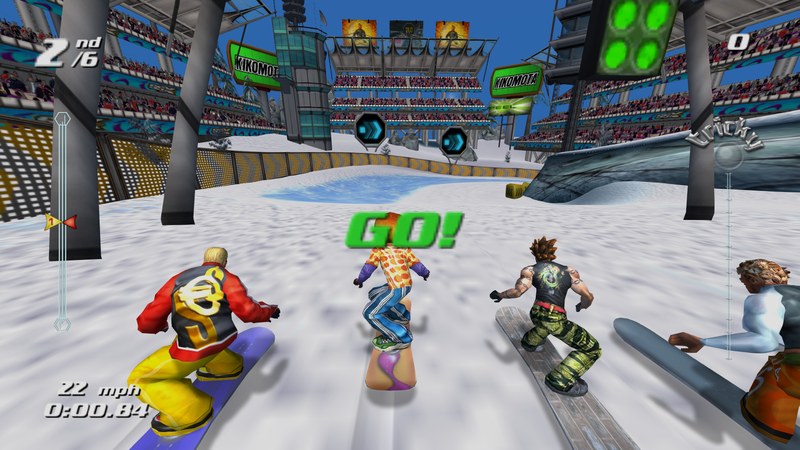
News
OpenTricky v0.1.6
13 November 2026 · stable release
A faster graphics pipeline, and a steadier game over long sessions. No setting is added, and races play out exactly as in 0.1.5.
- Light halos no longer hold the game back above 60 FPS. For every halo (the sun's glare, the lamps, the coloured lights), the game asks the graphics card how much of it is in view, and reads the answer at the start of the next frame, as the original game does. Above 60 FPS, that answer only came once OpenTricky had translated the whole frame and the card had drawn it, so the game and the translation ran one after the other instead of side by side. Now, while a halo's answer is still on its way, the game carries on with that halo's previous answer, if it is at most two game steps old (otherwise it waits, as before): a halo may fade in or out a frame or two later. The answers only set how bright the halos are, never anything in the race. At 60 FPS the game still waits, as in the original game, but the draws that come before its question now go to the card in batches, as they are made, so the answer comes back sooner.
- Lighter draw translation: a frame is thousands of draws, and turning each one into Direct3D 11 costs less. The vertex streams of a draw are sorted in a single pass, a texture lookup identical to the previous one is reused, a texture that is already bound is left as it is, and the translation's own switches are settled once per frame rather than at every draw. Same draws, same picture. The game in the zip is also built with link-time optimisation, which makes the same code run faster.
- Faster: compared with 0.1.5 at the same settings, in the heaviest scenes we know of (Mesablanca and Pipedream in Showoff, Pipedream in the sun, Aloha Ice Jam in Showoff), there are 49 to 56% more frames per second on average without a frame rate limit, with 1% lows 23 to 35% higher. On a 240 Hz screen, those four scenes now stay at 240 FPS, which 0.1.5 couldn't, and 91 to 99% fewer frames are shown twice; Garibaldi (Race) was already at 240 FPS. Gains depend on your PC.
- Steadier pacing above 60 FPS: with a frame rate limit, the frames between game steps come on a steady beat, set by your screen or by the limit. When a frame took longer than one beat, the beat before each game step used to be left empty, and the picture before it stayed on screen for one more refresh. Now that beat is left empty only if the step's own picture would otherwise slip to the next one, and that picture can arrive up to half a beat later than before. At Unlimited, OpenTricky now draws one more frame before a game step when, from the time recent frames took and how much it varied, it is at least as likely to help as to delay that step, instead of stopping early and waiting idle; a game step can come a little later than before.
- Steadier: each time a track was unloaded, a piece of it stayed in the game's memory, because the code that frees it had been missing from the recompilation since the first release. After hours of races without a restart, the memory ran out, and the game could freeze or crash (while loading a track, for example). That code now runs, as it does in the original game, and memory use stays flat however long you play. On a new install, the shaders the races need are built in the background while you are in the menus, the first time you start the game, instead of as short stutters during the first races (in our tests, no shader was built during a race). And the game's request for two of its threads, the sound among them, to run before the others now reaches Windows: in our tests, with other programs keeping the processor fully busy, the sound no longer crackles.
- The frames in between, above 60 FPS: the trail in the snow and the rider's sprays, puffs and powder now follow the board as it is drawn. They were laid from the board's position at the newer game step, a little ahead of the board, and in turns the trail's bright band could show in front of its nose. When the game moves a rider, or turns their feet or board sharply, in a single step (at the start and the finish of a race, and in some tricks), the rider now changes at once, as at 60 FPS, instead of sliding through poses the game never shows, and the rivalry icon above the rider moves with them; with Smoother legs in turns, the smoothing starts over from the new pose. At 60 FPS, and with Original Xbox, nothing changes.
- Less input delay at 60 FPS: in fullscreen, the game's frame timer now keeps in step with your screen's refreshes instead of drifting against them, for about 5 ms less input delay on a 60 Hz screen, with a steadier rhythm, and about 2 ms less on a 120 Hz screen. Nothing changes at 240 Hz, and the game's steps stay the same, in the same order. With Frame rate limit at Match screen, or above your screen's rate with VSync on or Adaptive, a game moved to a 60 Hz screen, or whose screen is switched to 60 Hz, now plays as at 60 FPS, with the original game's timing, instead of drawing frames in between for no gain and up to one game step of extra delay. For the other way round, see the known issues.
- Errors that now say something: when Direct3D 11 can't start (or the graphics card lacks feature level 11_0), the game used to show a black window and be reported as frozen; when the graphics driver stopped during play, the picture just froze. The game now writes a bug report and tells you what happened: in a message when you start it yourself, and on the launcher's LAST SESSION screen when you start it from the launcher. A launcher that can't start (without OpenGL 3.3, for example) now says so in a message, and PLAY no longer stays greyed out when one of the launcher's pictures can't be read.
- Also fixed: 16-bit textures, in every preset (Original Xbox included), get their exact colours: nearly half of their values came out one level in 255 too dark, on the ground, the snow and the rocks, which is too small to see. And two faults that never showed on screen: with some trick names (on the Showoff results, for example), the original game's code wrote just past the room set aside for the name; and above 60 FPS, about one to three times in a million frames, OpenTricky's translation read a draw command before the game had finished writing it (on the console, the graphics chip never reads that early), so a few draws could get the wrong render setting for a frame.
- VSync in the launcher: when VSync is Off, the launcher now warns under the setting that this means uneven motion and tearing, and that On, which every preset uses, costs very little in input delay. Keep it on: see the known issues.
Coming from 0.1.2, 0.1.3, 0.1.4 or 0.1.5? Update from the launcher: your saves, your settings and your disc image are kept. From 0.1.5, none of your settings move; from an older version, settings that match a preset take on its current values. No update offered yet, or you skip the launcher? See the install guide. Coming from 0.1.1? Install 0.1.6 fresh, in a new folder, as that guide explains.
Release notes and download on GitHub »
Full changelog, with every fix »
OpenTricky v0.1.5
2 November 2026 · stable release
Faster when the processor is the limit, and a round of fixes for 0.1.4. Races play out exactly as in 0.1.4.
- Faster: when the processor is the limit (mostly above 60 FPS), the part of OpenTricky that turns the game's graphics commands into Direct3D 11 now does less work for the same picture. Without a frame rate limit, that is 24 to 31% more frames per second on average than 0.1.4, with 1% lows 9 to 29% higher, on the three scenes we measured: Garibaldi (Race), Pipedream in the sun (Freeride) and Pipedream (Showoff). On a 240 Hz screen, Garibaldi (Race), Snowdream and Elysium (Showoff) hold 240 FPS; Pipedream doesn't (0.1.6 does: see above). Gains depend on your PC. Not measured on a Steam Deck.
- Closer to the original game, with fixes that are always on, in every preset: when the graphics card falls behind, the sun's glare and rays no longer drop out, because the card now gets as long to answer as in the original game. With the graphics card as the limit, this wait can lower the frame rate wherever the sun is in view (0.1.6 changes this above 60 FPS: see above). The game's videos, made at about 30 frames per second, no longer run on a timer of their own: each frame reaches the screen when the game finishes it.
- Picture: split screen at Draw distance Max keeps its colours. Above 60 FPS, a camera cut over a short distance no longer slides from one shot to the next. On screens wider than 16:9, the scene after the finish line plays in a 16:9 frame in the middle, instead of a camera that could end up inside the scenery; the results and the replay stay wide. Under Wine 9.0, Smooth edges (SMAA) works, and under Wine or Proton a shader that fails to build no longer slows the game to a crawl.
- Launcher: picking a disc image in Find my disc image no longer crashes it, and a long list scrolls inside the window. At each start, it now removes only the files that are exactly 0.1.1's, never through a folder link: anything else next to
OpenTricky.exestays, so delete old files yourself if you don't need them. Whenbinis a folder link, a failed update or Restore no longer removes it. - Smoothness and screenshots: no more pause just before the first race of a session; at 60 FPS with VSync on, a wait for the graphics card no longer ends at once on a signal left over from the previous frame, which kept a processor core busy. F12 in a folder that can't be written saves to
Documents\My Games\SSX Tricky\Screenshots, and the.txtbeside each screenshot finds your settings in a folder with accents. - Weather (new, Graphics): with PS2, snowfall comes without the thick fog of the original game, a fog the PS2 version doesn't have, so the night sky and the far slopes remain visible; and Garibaldi, Elysium and Untracked, where the original game rarely brings snow, stay clear, as on the PS2. PS2 in Recommended and Steam Deck; Original Xbox keeps the original fog.
- PlayStation controllers (experimental) (new, Controls, Off by default): a DualShock 4 or DualSense works without any other tool, with PlayStation buttons on screen when Button style is Auto. Leave it Off if DS4Windows, Steam Input or Steam's PlayStation support already handles the controller: it would be read twice. Tell us how it works with yours.
- Smoother legs in turns: above 60 FPS, after each jump, landing or trick, the legs and the board catch up with the game over one game step, instead of jumping back in a single frame. It stays on in Recommended. At 60 FPS that catch-up still takes a single frame, so the Steam Deck preset now turns it off, as Original Xbox does.
- A lighter Steam Deck preset: Smoother terrain seams and Lightmap smoothing, which add work for the processor and the graphics chip, are now off there too.
Coming from 0.1.2, 0.1.3 or 0.1.4? Update from the launcher: your saves, your settings and your disc image are kept, and settings that match a preset move to its new values. No update offered yet, or you skip the launcher? See the install guide. Coming from 0.1.1? Install 0.1.5 fresh, in a new folder, as that guide explains.
Release notes and download on GitHub »
Full changelog, with every fix »
OpenTricky v0.1.4
29 October 2026 · first stable release
Everything since 0.1.3 in one release: evenly paced frames, a race display in HD, new graphics options (most with a preview of each value), a cleaner launcher that works with every connected controller, and a round of fixes to the picture and to stability.
- Closer to the original game, with fixes that are always on, in every preset: the lattice towers and the speaker pole on Garibaldi, and the lit windows of Merqury City, no longer flicker. Above 60 FPS, the rival icon stays on its rider, and the Tricky meter no longer spins too fast (in our tests, up to 2.3 times the original speed at 144 FPS); at any Race HUD size, the gauge stays in one piece. Thin lines keep their width at high resolutions, and with HD HUD the pause screens look as in the original game.
- Frame pacing: at 60 FPS with VSync on (the default), on a 60, 120 or 240 Hz screen that reports its refresh timing, almost every frame now stays on screen for the same time, at the cost of a few milliseconds of delay (in our tests, about 3 ms on a 240 Hz screen, more on a 60 Hz one). Match screen (the default Frame rate limit) follows the exact refresh rate of a screen above 60 Hz, with less delay than 0.1.3 (in our tests, 1 to 2 ms less on a 240 Hz screen). Above 60 FPS, with a frame rate limit, frames are evenly spaced when your PC keeps up, and each one shows the game at the time it reaches the screen, so motion stays smooth. For 60 Hz screens that don't report their timing (the Steam Deck, some laptops), see the known issues.
- Less stutter from the log file: the game's log is now written in the background, and its periodic diagnostics are left out of it (in our tests on Elysium Alps, about three quarters fewer frames over 8 ms).
- HD HUD: the race display in HD (timer, gauges, positions and their text), clean at any resolution. On in Recommended and Steam Deck. HUD art by Bl4ckH4nd.
- New options: Render scale, Lightmap smoothing, Snow look, Shadow softness and Smoother terrain seams. Recommended turns on Lightmap smoothing and Smoother terrain seams, with the Soft snow; Original Xbox turns them off, with the Original snow. Render scale and Shadow softness stay at 100% in every preset. See the settings guide.
- Also changed: Texture filtering is 16x in Recommended and Steam Deck; Smoother legs in turns is no longer experimental; riders are always drawn with their most detailed model, in every preset, so they no longer switch to a simpler one in the distance.
- Shorter setting names: in Frame rate limit, The screen's refresh rate is now Match screen and 60 (as on Xbox) is 60 (Xbox); in Race HUD size, Like the Xbox (stretched) is now Stretched (Xbox); in Texture filtering, Off (as on Xbox) is now Off (Xbox); Save games folder is now Save folder.
- Look like the Xbox is gone from the settings: its fixes (fog volumes, lens flares, board tops, colours) are part of drawing the game correctly, so they are always on.
- Stability: a few rare freezes and crashes are fixed (when the game has no room left for a rider's model or shadow, that piece is now left out and the race goes on), a disc image the game can't start from gives a message instead of a crash, and
settings.iniis written in full before it replaces the old file. - Launcher: shorter help and a new look; Find my disc image; Check now and Cancel for updates. Update channel is Stable or Beta (formerly Unstable).
- Screenshots (F12) keep your window's size, are saved without a stutter and no longer overwrite each other in the same second; Shift+F12 saves a burst. A short
.txtbeside each one (one per burst) notes the track and your settings.
Coming from 0.1.2 or 0.1.3? The launcher updates it for you: your saves, your settings and your disc image are kept, and if your settings match a preset, they move to its new values. If you skip the launcher, it can't offer the update: see Updating. Coming from 0.1.1? Install 0.1.4 fresh, in a new folder: see the install guide.
Release notes and download on GitHub »
Full changelog, with every fix »
OpenTricky v0.1.3
13 October 2026 · unstable test release
A short release for Linux and the Steam Deck, plus one fix to the music.
- Linux and Steam Deck (Wine, Proton): the very low frame rate is fixed. The game's shaders run on the graphics card again under Proton, and the soft shadows no longer crash Wine's shader compiler. A player confirmed it: 60 FPS locked, 120 at most.
- The music, as in the original game: under the announcer's voice, on the results screen and in the menus, it now fades down and back up over one second instead of jumping at once.
- Steam Deck preset: the launcher applies it by itself at the first start on a Steam Deck.
- Signed updates: the launcher checks the signature of the downloaded zip, and refuses one that is unsigned or modified.
- What's new in the launcher now reads a
whatsnew.txtfile.
Coming from 0.1.2? The launcher updates it for you. Coming from 0.1.1? Install 0.1.3 fresh, in a new folder: see the install guide.
Release notes and download on GitHub »
Full changelog, with every fix »
OpenTricky v0.1.2
11 October 2026 · unstable test release
A round of fixes that bring the game closer to the original, steadier long sessions, and a new Save profile.
- The "melting" snow is fixed: on Snowdream especially, the terrain could look deformed and your rider sink into the snow. It was a defect of the port (the Race HUD size setting leaked into the scenery), not of the game.
- Showoff snowflakes can be collected again: a wrong collision check in the port made them almost impossible to catch.
- The end of a race: above 60 FPS, the crowd, its chants and the track ambience were cut. They are back, so races may sound busier than before: that is the original. The rider's voice is heard again during the close-up.
- Steadier races: skipping the trick screen at the start no longer shows a stretched picture, and long sessions no longer lose the track's world after about five events in a row.
- The HUD at any frame rate: the race HUD and its menus run at the right speed above 60 FPS, and the score, the boost and the Tricky meter no longer jump back during a trick.
- Save profile (Settings → Game): My save, your own progress, or Unlock all, a separate save with everything unlocked through the game's own unlock cheat. Your own save is never touched.
- Wine and Proton (Steam Deck, Linux): the game could freeze before the first picture, or crash when you pressed Play. It now picks another memory area when the one it needs is taken. Version 0.1.3 then fixed the low frame rate there.
- A tidier folder: the game is now
bin\SSX Tricky.exe, and the top of the folder keepsOpenTricky.exeand your own files. Shortcuts to the oldSSX Tricky.exeneed to be made again. - A launcher that tells you more: a short yellow note under a setting that does nothing on your screen, a banner when
settings.inicouldn't be read as written, Resolution limited to the sizes of your screen shape, and Restore asks before it does anything. - New defaults: Speakers is Stereo, and Smoother legs in turns is on (experimental, the picture only; off in the Original Xbox preset).
- Also: Start skips the intro videos at the first press once the opening logo is over, VSync Adaptive tears less, compiled shaders are kept on disk for smoother launches, saves work in folders with accents, and crash reports no longer keep any folder name.
Coming from 0.1.1? Install 0.1.2 fresh, in a new folder: see the install guide.
Release notes and download on GitHub »
Full changelog, with every fix »
OpenTricky v0.1.1
8 October 2026 · unstable test release
- A new launcher,
OpenTricky.exe: settings in six tabs, presets (Original Xbox, Recommended, Steam Deck), full keyboard and controller remapping, and a What's new panel.SSX Tricky.exestarts the game straight away with your settings. - Updates from the launcher: it tells you when a new version is out and can install it for you, after checking the download.
- The original PS2 controls, everywhere: all 15 grabs on the shoulder buttons and triggers, Boost and Tweak on Square, spins and flips on the D-pad, L3 to cancel a jump.
- Button style: Xbox modern, PlayStation modern or PS2 original (the PS2 look: pixel buttons at their original size), in the menus, the trick book, the replay help, and on the controller of the trick tutorial and Configure Controller.
- Saves: a rare save loss is fixed, and the game keeps a copy of the previous save before overwriting it.
- Wide screens: the race HUD keeps its proportions on every screen shape, with a size setting; the menus are shown as the Xbox drew them, in 4:3 (or the game's own 16:9 menus if you prefer); the start-up videos keep their 4:3 shape.
- 5.1 surround (not yet tested on real 5.1 speakers: reports welcome), VSync, and a frame rate limit that follows your screen.
- Faster and smoother: less overhead in the busiest scenes, and steadier interpolated frames at high frame rates.
- More stable: fixes for rare start-up freezes, the crash while a race loads, and a rare freeze or crash near the finish line, mostly at uncapped frame rates. Crash and freeze reports are saved next to the game, to attach to a bug report.
Release notes and download on GitHub »
Full changelog, with every fix »
OpenTricky v0.1.0-unstable
4 October 2026
The first test release of OpenTricky. Release notes and download on GitHub »